 screenrove
Changelog page design: 5 real examples and what to steal
Changelog page design examples from Raycast, Leonardo.ai, Postman and StackBlitz: version navigation, change-type labels, dates and what to copy for your own.
Of the five changelogs on our blog pages wall, only two let you jump straight to a specific release, and the newest entry on one of them is from April 2024. Good changelog page design is mostly about answering two questions fast: what changed recently, and is this product still moving? The examples below from Raycast, Leonardo.ai, Postman and StackBlitz answer them with very different degrees of success.
A warning up front: the sample is small. The blog pages wall holds 18 screens from 12 products, and 5 of them are changelogs or "what's new" pages, from 4 products. Read this as a close look at named examples, not a survey.
Five changelogs side by side
| Page | Where it lives | Version shown | Year on the date | Change-type labels | Jump to a release |
|---|---|---|---|---|---|
| Raycast app changelog | Website | Yes (v2.5) | Yes | Emoji headings | No (platform switcher) |
| Raycast API changelog | Developer docs | Yes (2.5.0) | Yes | Emoji headings | Yes, side rail |
| Leonardo.ai What's New | In the app | Yes (v1.7.0) | Yes | "NEW:" prefix | Yes, dropdown |
| Postman What's New | In the app | No | No | Chips | No |
| StackBlitz What's new | In the app | No | No | Emoji headings | No |
Four of the five group changes by type. Three show a version number and three put a year on the date, and they are the same three. And four of the five are dark, with Postman the only light one.
Raycast: one release, two changelogs, two audiences
Raycast publishes the same release twice. The app changelog on its website is written for users: a big "Changelog" title, a segmented switcher for macOS, Windows, iOS and macOS V1, and each release pinned to a left gutter with a red "v2.5" badge and "September 24, 2026". The release itself opens on a hero image titled "External Model Providers" and a plain-English paragraph about what it means for you.
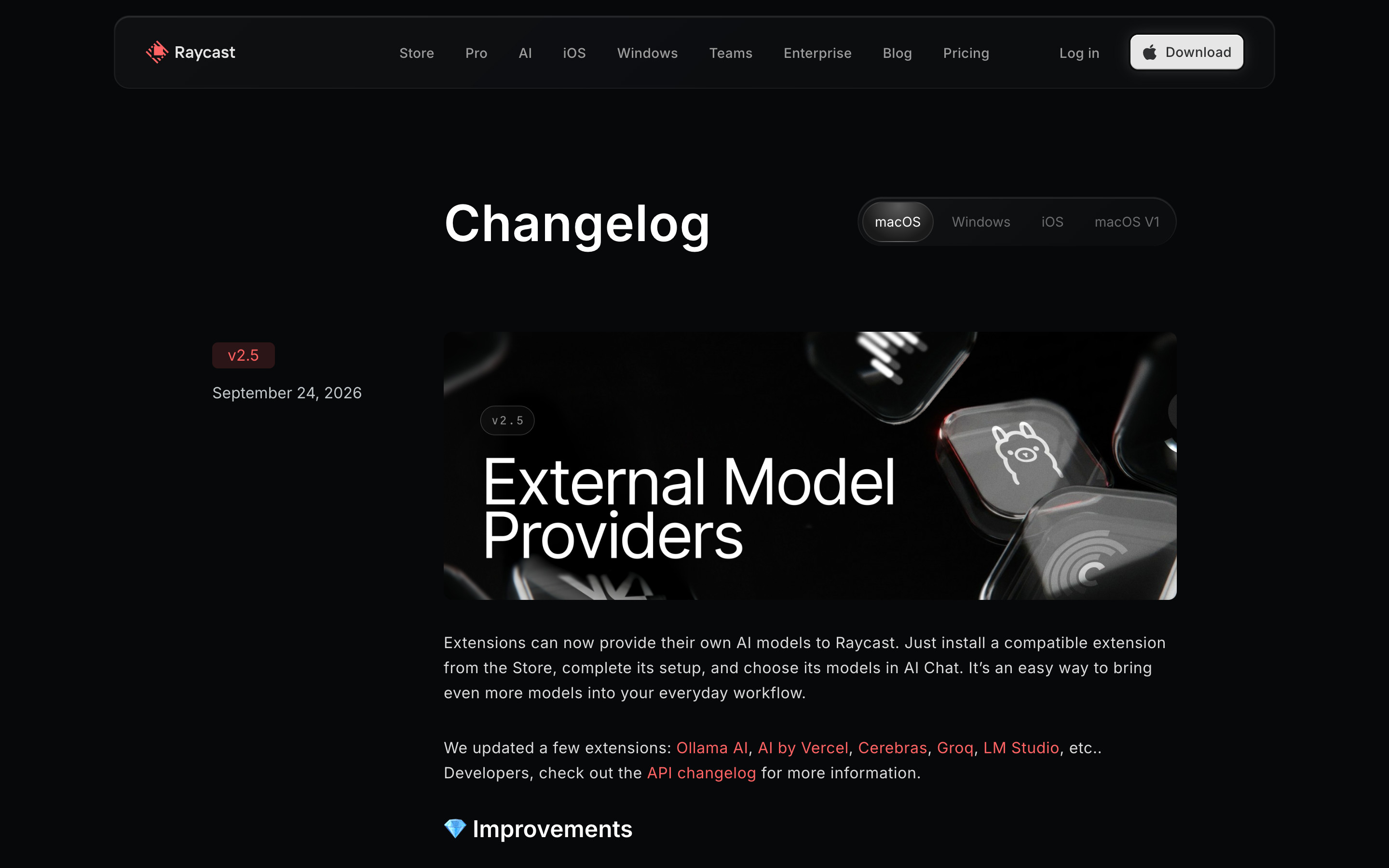
The switcher keeps each platform's release line separate, and "macOS V1" keeps the old app's history reachable without cluttering the current one.
Then, under the intro, a single sentence: "Developers, check out the API changelog for more information." That link goes to the second changelog, inside Raycast's GitBook developer docs, where the same release appears as "2.5.0 - 2026-09-24" and the content shifts to manifest keys and function names in code spans.
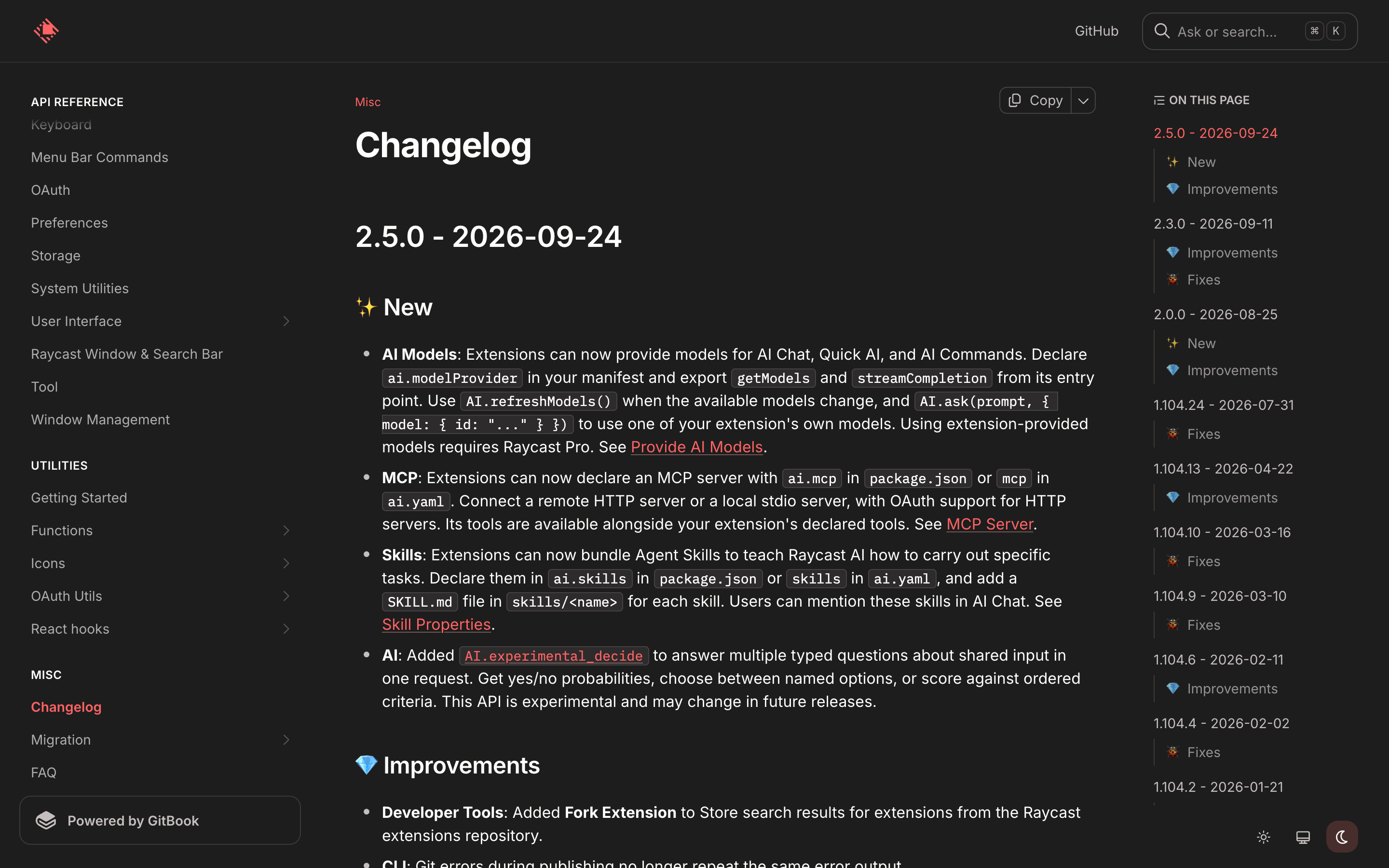
The right-hand "On this page" rail is the best piece of changelog navigation in the set. It lists 10 versions, from 1.104.2 (2026-01-21) to 2.5.0 (2026-09-24), and under each one only the sections that release contains: ✨ New, 💎 Improvements, or a bug icon for Fixes. Count the tags you can see and a story appears. Of the 9 releases whose tags are visible, 5 carry Improvements, 5 carry Fixes and only 2 carry anything New (2.0.0 and 2.5.0).
Leonardo.ai: a version dropdown and a date divider
Leonardo.ai's What's New lives inside the app, as a rocket-icon item in its left navigation. The header repeats the current release in small italic type, "v1.7.0 - 9 Oct 2026", and the same string fills a dropdown in the top-right corner. That dropdown is the navigation: pick a version, land on its notes.

Below the header, a thin rule runs the full width with "9 Oct 2026" centred in it. Like a date separator in a chat thread, it marks a boundary without a heavy card. The entry reads like a launch post: a "NEW: Nano Banana 2.1" headline, a one-line subhead, a large visual, then three short bullets.
Postman: release notes as a social feed
Postman's What's New in the Public API Network is a changelog written by other companies: API publishers post their own updates. Each card carries a verified publisher name, a short date, a headline and type chips. Datadog's card has "New Feature" plus folder chips and "+3"; Rootly's has a green "Improvement" chip.

Two details are worth copying. Long bullet lists fade into "Read more", so a seven-item release stays compact. And the footer shows reactions (51), comments and views (1.1k), the only changelog in the set that tells readers anyone else is paying attention. The cost: dates read "Jun 26" and "Jul 1", with no year and no version, which is fine in a live feed and ambiguous in an archive.
StackBlitz: the freshness problem
StackBlitz's in-app "What's new in ⚡ StackBlitz" page has sound structure: entries grouped under 🍿 "New Features & Enhancements" and 🐞 "Bug Fixes", bold lead-ins on every bullet, and dependency versions such as TypeScript 4.7.2 to 5.4.2 set in code chips. But the top entry, when we captured it on 22 October 2026, was "April 2024 Updates", dated only "May 01".

We can't tell from a screenshot whether updates moved elsewhere, and neither can a reader. A changelog linked from the product's sidebar signals momentum; a stale one signals the opposite.
What to steal for your changelog page design
- Put the year and the version on every entry. Raycast's "2.5.0 - 2026-09-24" and Leonardo's "v1.7.0 - 9 Oct 2026" stay unambiguous forever; "May 01" does not.
- Make releases jumpable. A side rail (Raycast) or a version dropdown (Leonardo) beats endless scroll once you have more than a handful of entries.
- Tag by change type, and show the tags in the index. Listing New / Improvements / Fixes per release in the rail lets readers skip patch releases.
- Split audiences, then link them. Users get benefits and a hero image; developers get code spans. One sentence connects the two.
- Truncate long entries with a fade and "Read more", as Postman does, so the feed stays scannable.
- Date-check the top entry. If it is older than a year, the page is working against you.
How we counted
We captured these screens in desktop browsers with research accounts in September and October 2026. A vision model recorded each screen's attributes, including the page type used to pick these five, and we checked each claim against the screenshots; the attributes are visible on each screen's page. We record what we saw, not how these pages perform, so nothing here is a claim about engagement.
Building one now? Connect the Screenrove MCP server and ask your agent for "changelog pages with version navigation" to pull these references into your editor.