 screenrove
Empty state illustration: when art earns its place
We checked 360 SaaS empty states: 53% use an empty state illustration. The ones that score well explain the feature or preview the result, not fill space.
Of the 360 empty states we captured across 109 SaaS products, 192 (53%) use an empty state illustration or spot icon, and all 11 screens our review scored 5 out of 5 are among them. But the art is not what lifts them: an illustrated empty state with no button averages 2.88, barely above a plain-text one that has a button (2.71).
So the useful question is not "should we draw something?" but "what is the drawing for?". The screens that score well use art to explain the feature, show the result in advance or carry a brand voice. The ones that score badly use a grey icon to fill a gap. Examples below come from the empty states wall.
Empty state illustration by the numbers
Each screen in the wall is tagged for whether it has illustration or icon art, whether it offers a call to action, and a 1 to 5 score for how well it does its job. Splitting by those two tags:
| Empty state | Screens | Avg score | Scored 4–5 |
|---|---|---|---|
| Illustration + button | 124 | 3.56 | 68 (55%) |
| Illustration, no button | 68 | 2.88 | 14 (21%) |
| Text only + button | 75 | 2.71 | 15 (20%) |
| Text only, no button | 93 | 2.17 | 6 (6%) |
Three things stand out. First, art and an action compound: together they average a full point above either alone. Second, art without a next step is not a fix; 3 of the 23 screens scored 1 are illustrated, and in each case the picture is a generic glyph doing nothing. Third, where art appears is uneven. It sits on 65% of first-use empty states but only 22% of blank canvases, where the empty editor usually speaks through panels and placeholders instead. And 58 of the 109 products mix illustrated and plain screens, so most teams are deciding page by page, not by policy.
Art that explains the feature
The strongest pattern is an illustration that works as a diagram, answering "what is this page for?" before the user reads a word.
Softr’s Global data restrictions draws a faded table with three labelled cursors on it: Employee "Can edit assigned tasks", Client "Can view their projects", Admin "Can edit everything". That is the entire concept of row-level permissions in one picture, sitting above a single "Add restriction" button.

Runway’s Brand Kits does the same with a before/after: a red cup tagged @product and a cyan backdrop tagged @background become one composed shot. Lucidchart’s empty presentation panel shows shapes with plus badges being added to a slide, matching its copy, "Select any shape, frame, or doc on your board and add it as a slide".
Mural goes one step further and acts out the exact gesture. Starred zooms into a mural tile with its menu open on "Add to Starred" under a cursor; Templates shows a "Your mural" menu with "Publish as template" highlighted. The illustration is the step you need to take, simplified.

Even a cleared state can explain. monday’s notifications panel draws a notification itself, an @ bubble with a red "4" badge and a reply pill, so "You'll get notified here whenever someone @mentions or replies to you" has a picture to point at.
Art plus a preview of the payoff
PostHog holds three of the 11 top-scored screens, and the split of labour is instructive. Each page has a small hedgehog for personality on the left and a large "example data" mock on the right showing the finished feature. Experiments previews "Your results, once running": control at 3.1% against one-click at 4.6%, "Chance one-click wins 96%". Feature flags shows dark-mode at 100% and beta-invites at 25%.

Session replay has nothing to create, so it drops the button entirely: "Recording is on. Waiting for the first session" beside an example list of recordings. Alone, the mascot would be decoration; beside the mock it is a brand cue on a page already doing its job.
Brand-led art: when the illustration is the voice
Some products use empty states as brand real estate, which works when the copy is as confident. Gumroad has three of the 5s: full-width flat illustrations in a dashed frame. Sales is a banknote with a beret-wearing painter in place of a portrait. Payouts shows a cuffed hand serving a receipt printed in binary code while two yellow hands hold out cash, over "Let's get you paid." Emails is a fist gripping pencils and brushes.

Two quieter versions: Padlet’s empty trash is a detailed line drawing of a character reading among packing boxes, with a yellow lamp as the brightest colour, over "You haven't trashed any padlets yet." Resend uses glossy 3D icon tiles on a soft glow, a different object per page (Templates gets its own tile) in one consistent style. It is the cheaper model to copy.
Reuse: one picture, many pages
Reuse is common and is only a problem when the copy gets reused too. Gamma puts the same painterly hot-air balloon on Themes, Sites and Trash. Themes gets bespoke copy ("No custom themes... yet"), but Sites and Trash both say "No gammas detected", and Sites adds "Try changing your filters" while the default All tab is selected on a new account.

Better reuse: Toggl’s notifications panel shrinks the block illustration from Tasks and pairs it with copy written for that panel ("You're all caught up"). Voiceflow keeps one template for Tools and Workflows, same circle, layout and inline "Learn more", but draws a different spot illustration for each and adds 12 integration chips to Tools. Hotjar runs one layout across Heatmaps, Dashboards and Session Replay, where the "art" is an embedded tour (15, 14 and 13 steps) captioned "This tour uses sample data."
Real assets instead of art
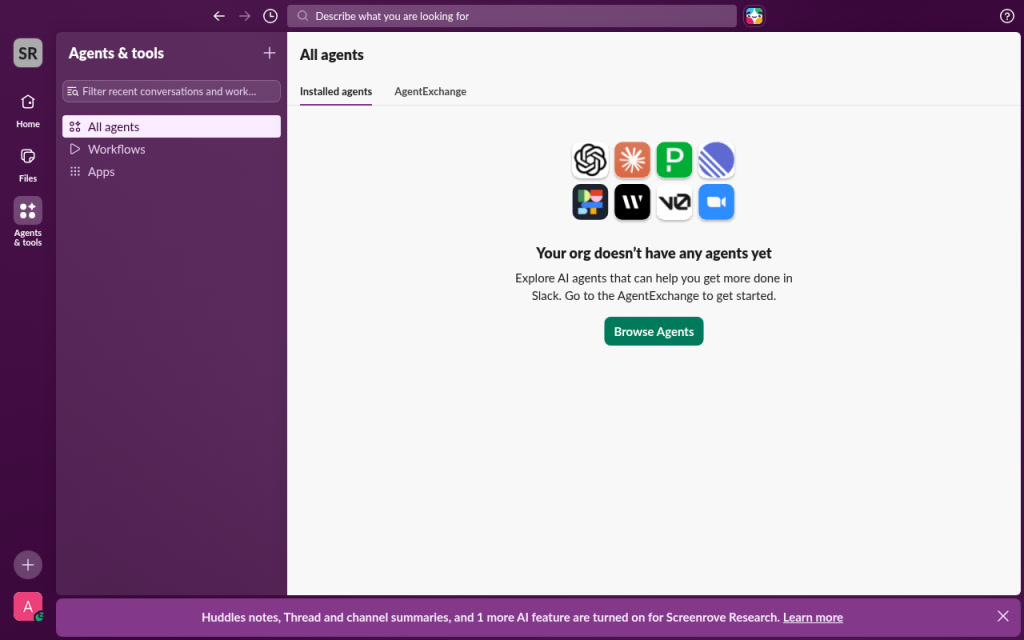
When the empty page is about connecting other things, the logos of those things beat any drawing. Slack’s agents page shows a 4×2 grid of real partner app icons, OpenAI and Zoom among them, above "Your org doesn’t have any agents yet" and a green "Browse Agents".
Glasp’s empty highlights page drops illustration entirely for 14 import-source cards, Kindle to CSV Import, each with its own logo. It is tagged as having no illustration, yet it is one of only 21 text-only screens to score 4 or higher, because every tile is also a way in.
Plain text done well, and badly
No art is a legitimate choice. Render’s environment groups is left-aligned text: a bold "You have no environment groups.", one sentence defining the feature and one "+ New Environment Group" button. Nothing is missing. Splitwise skips the button but points at the real one: "To add a new expense, click the orange “Add an expense” button."

The bad versions share one trait: the user is told the page is empty and nothing else. Lucidchart’s empty folder is one grey line, "This folder is empty". Kapwing answers a failed search with "No projects found for "mountain". Try searching for something else." Adding an icon does not rescue this: Coolors pairs a grey bucket outline with "You don't have any collection yet." and no action, and Prezi shows a no-results magnifier on a brand-new account's All projects, reused again on Shared with me.
What to steal
- Draw the feature, not the mood. If your illustration could sit on any page, it is decoration. Softr's role cursors and Mural's menu close-ups could only belong to one page.
- Never ship art without a next step. In our set, illustrated screens without a button score about the same as plain text with one.
- Put the payoff next to the mascot. PostHog's pattern, small brand character plus a large labelled "example data" mock, works for any analytics or reporting page.
- Reuse the style, not the sentence. Resend's one visual system and Voiceflow's one template scale; Gamma's reused filter advice does not.
- Use real logos for integration pages. Slack and Glasp show what can be connected instead of illustrating "connection".
- Plain text is fine if it defines and acts. Render's three lines beat a grey glyph above "No projects to show".
Browse the illustrated empty states with a call to action for more examples, or the no-results screens to see how few of them earn their art.
How we counted
We captured these 360 screens in desktop browsers with research accounts in September and October 2026. A vision model recorded each screen's attributes (illustration, call to action, kind of empty state) and a 1 to 5 score; you can check them on each screen's page. "Illustration" includes spot icons, so the 53% is an upper bound for drawn art. Scores are our judgement of how well a screen explains and directs, not conversion data: we capture what we saw, not A/B test results, and a reviewer can favour richer visuals.
Building an empty state now? Connect the Screenrove MCP server and ask your agent for illustrated first-use empty states with a single primary button.