 screenrove
Filter UI design: the numbers 55 catalogs put on cards and filters
Filter UI design and social proof in 94 real catalog screens: who shows usage counts on cards, counts in filters, and how Relume and SurveyMonkey recount live.
Only 19 of the 94 public catalog screens we captured put a popularity number on the card, and nine of those 19 are community showcases. Template galleries, the place a line like SurveyMonkey's "Used 386600+ times" would seem to help most, do it on 6 of 41 screens, and app directories on just 1 of 20. For filter UI design the picture is similar: 8 of 55 products print a count beside their filter or category options, and only SurveyMonkey and Relume update a count live as you filter.
This pattern study looks at those numbers: usage counts on cards, counts in filter columns, result totals and live recounting. It draws on the public catalogs on our catalogs and galleries wall: templates, apps and integrations, assets, community work and marketplace listings.
Who puts a number on the card
We checked every public catalog screen for a per-item number that signals popularity: uses, downloads, installs, forks, hearts, views or ratings. Twelve of 55 products show one. The split by catalog type is lopsided.
| Catalog type | Screens | With a number on the card | Examples |
|---|---|---|---|
| Community work | 15 | 9 | Dribbble hearts and views, Coolors hearts, Rive hearts, Spline views and likes |
| Products & listings | 2 | 2 | Gumroad "5.0 (6)", Airbnb "4.65 (81)" |
| Templates | 41 | 6 | SurveyMonkey, Make, Tally, CodeSandbox |
| Apps & integrations | 20 | 1 | Raycast installs |
| Assets & media | 16 | 1 | ElevenLabs downloads column |
Community sites count because the number is the product: a Dribbble shot is ranked by hearts, so the hearts ship. Template galleries that show counts treat them as a sales line. SurveyMonkey puts "Used 386600+ times" directly under the Customer Satisfaction Survey title, Make ends each card with "Used 110579 times" under a rule, and Tally shows a raw download count, "↓ 113517", beside the creator's avatar.

The other 31 products put no count on a card, a filter or a result header at all. Softr's template picker leans on pastel previews instead, UXPin's cards say "Created by UXPin" and stop, and Taskade's cards carry type chips but no usage. Others signal popularity with a label instead: Grafana and Cal.com have "Most popular" rows, Perplexity and Deepnote a "Popular" group, Kittl a "Most used" sort, and Mixpanel sorts 100 results by "Most Viewed" without showing a single view count.
Format and order tell you how seriously to read it
The same idea comes in at least four formats. SurveyMonkey rounds down with a plus sign and no separator ("386600+"). Make and Tally print the exact figure without a separator ("110579", "113517"). Raycast uses separators ("757,545"). CodeSandbox, Coolors and Dribbble abbreviate ("255.5k", "97.4K", "10.2k"). Exact figures read as live data, rounded ones as copy, and SurveyMonkey, Make and Tally all print six digits without a separator, which is harder to scan.
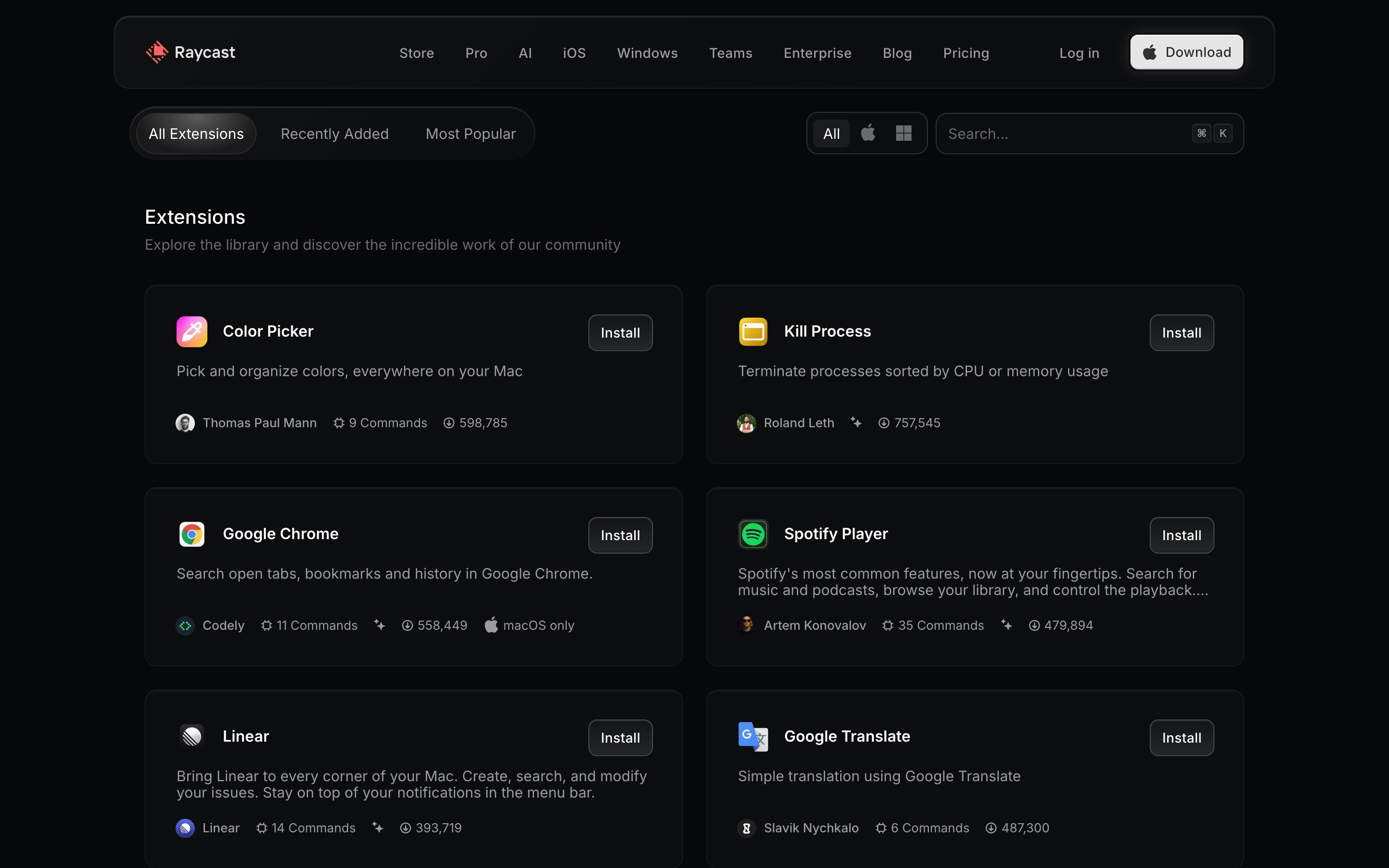
Order matters as much as format. Make's grid runs strictly downhill, from 110579 to 21697, and Tally's from 113517 to 66520, so the number explains the order. Raycast's default tab does not: Linear (393,719) sits above Google Translate (487,300), and popularity has its own Most Popular tab. CodeSandbox labels its tab "Popular", yet Angular, the most-forked template shown at 291.5k, is seventh of nine. When the number and the order disagree, the reader has to work out which one to trust.
Small numbers cut the other way. Spline's community opens on a "Spline 3D Starter File" card with "70 views 2 likes"; a Rive marketplace search for "loading" returns hearts of 2, 5 and 6; ElevenLabs' sound-effect table shows downloads between 118 and 517. Counts persuade at Dribbble scale and undercut at two likes.
The counts are also visibly live. Tally's Registration Form Template read 113517 in the public gallery and 113515 in the in-editor picker on the same day, and Dribbble's Cryptojet shot showed 126, 127 and 128 hearts across three of our captures.
Filter UI design: counts in the filter column
Eleven screens from eight products print a count next to each filter or category option: SurveyMonkey, Jotform, Maze, Taskade, ToolJet, Cal.com, Confluence and Mural. Jotform uses the column to size its library: Survey Templates 13,850, Application Forms 6,429, Registration Forms 5,103, each in a grey pill.

Those counts rarely add up, and that is fine as long as nobody expects them to. Jotform's ten visible types sum to more than twice its own headline, so one template clearly sits in several types. Maze shows "All Maze templates 55" above eight use cases that sum to 71, because a card such as "Run closed card sorting" is tagged Content Testing and Concept Validation. ToolJet's "ALL DATA SOURCES (98)" sits above categories totalling 103, with Databricks listed under both Commonly used and Databases. If your filter options overlap, label the top count as the total and let the rest be facets.
Counts can also live on category tiles rather than in a column. Cal.com's photo tiles read "Conferencing 24 apps" and "Automation 21 apps"; Taskade's sidebar runs from Featured 9 to Run Operations 14, and a "Recent 1" row appears after you open a single template.
Live recounting turns the filter into a preview
A static count tells you how big a category is. A live count tells you what your filter just did. Two products in the set recount as you filter. Relume's component library shows "1757 Components" in the corner of the toolbar; ticking "3 Columns" in the Layout dropdown changes it to "279 Components" and adds a "Clear all" link beside the filters.

SurveyMonkey goes further. Searching "event feedback" rewrites every category count in place: Events drops from 33 to 8, Most Popular from 13 to 1, Benchmarkable from 26 to 5, and every category that would return nothing turns grey at (0). The filter column becomes a map of where the matches are before you click anything.

Most products stop at a result total. Lovable shows "228 results" and "All templates (228)" but no counts on its Category or Subcategory options; Confluence says "Displaying all 143 templates." with a "Popular 15" chip; Mural's search splits results into a "Mural templates (19)" tab and a team tab at (0), so an empty team library is visible rather than hidden. A lighter variant counts the filters, not the results: Adobe Express shows "Clear (2)", Kittl badges its Filters button with a 1, and Appsmith heads its list "Categories (1)".
Filtering by who you are
A few catalogs filter by audience before topic. Leonardo puts a row of chips under the Blueprints search: For You, All, Creatives & Graphic Designers, Marketing Professionals, Content Creators and Photographers & Videographers, with For You selected. Mural's For you tab opens on "Product managers recommend these templates", and its sidebar adds a Roles group under Use cases and Ways of working. Prezi's learning games put an "Audience · Auto" picker beside the template picker, and Tally separates "By my team" from its topic pills. None show counts, which suits a starting point.

What to steal
- Put usage on template cards if the numbers are big and real. Only 6 of 41 template screens do it. Use one format, with thousands separators, and keep it under the title where SurveyMonkey and Make put it.
- Hide counts that embarrass the item. "2 likes" works against a card. Show the number above a threshold, or swap it for a "Popular" label as Grafana and Cal.com do.
- Make the order match the number. If a tab says Popular, sort it by the count you show, as Make and Tally do.
- Count filter options, and recount them on search. SurveyMonkey's greyed (0) categories are the most useful filter UI in the set. Relume's live total is a good start; adding per-option counts would show the 279 before the click.
- Label totals honestly when facets overlap. Jotform, Maze and ToolJet all have options that sum past the total. Call the top number the total and say "templates can appear in more than one type".
- Offer an audience row before the topic list when your users differ more by role than by task, as Leonardo and Mural do.
How we counted
We captured these screens in desktop browsers with research accounts in September and October 2026. A vision model recorded each screen's attributes, which you can check on each screen's page; the "public catalog" set is every screen tagged as templates, apps and integrations, assets, community work or listings (94 screens, 55 products). We then read each screenshot for numbers on cards and filters. The counts above are what we saw on those screens, not every page of each product, and we have no data on whether any of these numbers change what people pick.
To pull these references into your own build, connect the Screenrove MCP server and ask your agent for catalog pages with filter counts or usage numbers on cards.