 screenrove
Landing page CTA examples: the hero button isn't always Sign up
Landing page CTA examples from 258 captured heroes: only 25 lead with Sign up. See npm commands, email fields, OS downloads and the proof under the button.
Only 25 of the 229 landing page heroes we captured with a labelled button start that button with "Sign up". The rest ask you to get started, start free, copy an npm command, download a desktop app, type a username or claim a work email, and 27 pages have no hero button at all. This is a set of landing page CTA examples from the landing pages wall (258 pages from 132 products), plus a look at the proof each team puts directly under that button.
One button, two buttons, or none
Two buttons is the most common hero, but only just: 110 of 258 pages (43%) carry two, 107 (41%) carry one, 14 carry three or four, and 27 (10%) have none. The split changes with the page type. Just 4 of 125 homepages drop the hero button, against 20 of 122 feature pages.
Linear is the clearest case. All three of its pages in the wall (AI, Features, Insights) have a headline, a muted subline and a dark visual, and the only way in is the small white "Sign up" pill in the nav. The other zero-button heroes replace the button with something you use:
- Lovable puts a single prompt card ("Ask Lovable to create…") under "Build something Lovable", with no button beside it; the homepage and its AI app builder page do the same. Prompt boxes appear in 28 heroes across the wall (see them all).
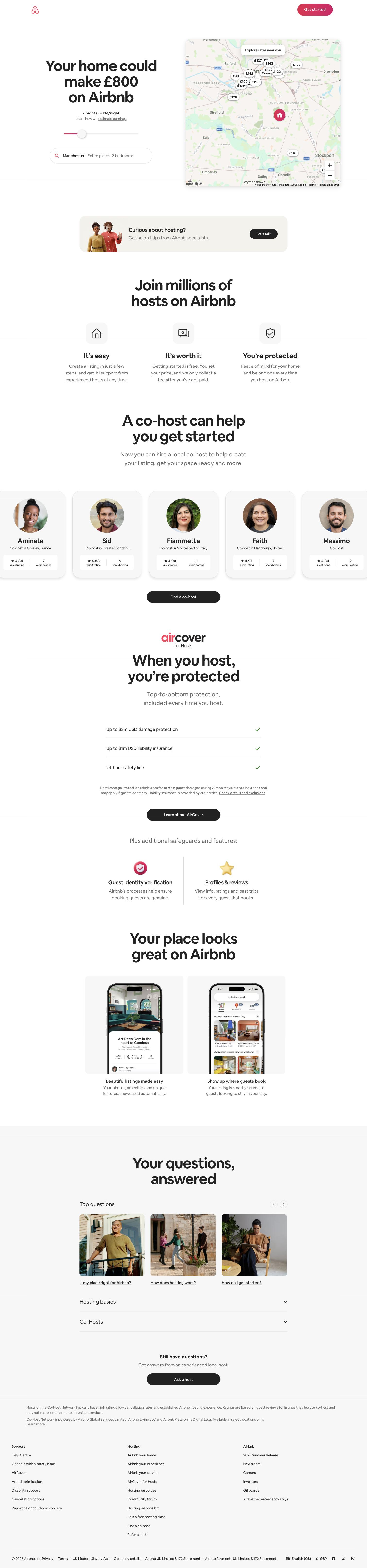
- Airbnb's host page makes the headline the calculator: "Your home could make £943 on Airbnb", driven by a nights slider, a location pill and a map of nearby nightly prices.
- Deepnote spends the hero on a "humans | agents" toggle pill inside the headline, then goes straight to "600,000+ data professionals" and a logo row. "Get started" lives in the nav.
Landing page CTA examples that aren't a sign-up button
Copy a command
tldraw's primary action is a black monospace chip reading "npm create tldraw" with a copy icon, followed by a text link, "or Build with a starter kit". For React developers the first step is a terminal, so the hero skips the form. Postman's homepage goes further: no sign-up button in the hero at all, just an "npm install -g postman-cli" pill with an npm dropdown, and three icon buttons (Windows, Apple, Linux) labelled "Install for desktop". "Sign Up for Free" is still there, in orange, in the nav.


Download for your OS
Tana's homepage showed our desktop browser two white buttons, "Ubuntu/Debian" and "Fedora/Redhat", with "or sign up on web" as a text link underneath. The download options matched the operating system we captured on. "Download for macOS" is the tenth most common primary label in the wall (3 pages, Cursor among them).
A field in the hero
Some heroes put an input directly under the headline, and the field says what kind of account is coming:
- Work email + button: Trello ("Email" + "Sign up - it's free!", with the privacy line underneath), UXPin ("Work email" + yellow "Try for free") and Voiceflow's platform page ("What's your work email?" + "Get started").
- Email + qualifier: Folk adds a "Team size" select between the email field and a black "Start for free", and reuses the same form on its pipelines page.
- Email fused to the action: Mercury joins "Enter your email" and "Open account" into one pill, with "Launch demo" beside it.
- The full form: Jira gives the whole right column to sign-up: a "Work email" field, a full-width "Sign up" button and "Or continue with" Google.
- The product's own syntax: Linktree's field is prefilled "linktr.ee/", so the first thing you type is your username.

Three choices, stacked or side by side
Three-button heroes are rare (12 pages) and they usually mean the button is a sign-in method. Jotform stacks three full-width buttons in one card: "Sign Up with Google" in blue, "Sign Up with Microsoft" in charcoal, "Sign Up with an email" in orange, then "IT'S FREE!". Asana does the same with Google and Microsoft side by side above an email field and a black "Continue". The exception is Zapier's Workflows page, where the three buttons are three different offers: "Try classic Zaps" (orange), "Get early access to Next Gen Zaps" (black) and "Talk to Sales" (outlined).

What the button actually says
Across the 229 heroes with a button and a recorded primary label, "free" appears in 119 (52%). Labels starting "Get started" account for 60, labels starting "Start" for 50, labels starting "Sign up" for 25. The ten most common exact labels (case ignored):
| Primary hero label | Pages |
|---|---|
| Get started | 28 |
| Start for free | 23 |
| Get started free | 14 |
| Get started for free | 9 |
| Sign up | 7 |
| Start building | 5 |
| Sign up for free | 5 |
| Sign up free | 5 |
| Try for free | 4 |
| Download for macOS | 3 |
The long tail is where the product shows through: "Build now", "Create form", "Deploy now", "Open account", "Start tracking for free", "Add to Chrome — it's free". Each names the first thing you do in the product; "Get started" could sit on any page in the wall.
Black, white or brand colour
For each page we recorded the accent colour of the primary action. Of the 227 heroes with a button and a recorded accent, 67 are near-black (Figma, Asana, Folk, Vercel and Cursor among them) and 15 are near-white, mostly white pills on dark pages such as Framer, Gamma and Neon. That is 82 pages (36%) where the main button carries no brand colour. Saturated buttons are still the majority: Jotform's orange, Mercury's blue-violet, Toggl's deep plum.
What sits right under the button
Logo walls appear on 152 of 258 pages (59%) and testimonials on 148 (57%); 69 pages show neither. The logo wall is mostly a homepage habit: 99 of 125 homepages have one, against 46 of 122 feature pages. Jira writes a sentence on top of its logos ("85% of Fortune 500 companies use Atlassian products"), and UXPin runs four logos along the bottom edge of the hero gradient.
The heroes that stand out swap logos for ratings, awards or quotes, placed so they are read in the same glance as the CTA:
- Toggl closes its hero with a row of seven review-site badges, mostly G2 and Capterra, including "4.7/5 from 2.3k reviews" and a Capterra "Voted best ease of use" laurel.
- TickTick puts four laurels under its app screenshot: Editors' Choice (App Store), App of the Day, Editors' Choice (Google Play) and "470k Ratings 4.9".
- Todoist sits a "347K+ ★★★★★ reviews" chip with Apple and Android icons between the subhead and "Start for free", then three press quotes from The Verge, PCMag and TechRadar.
- Voiceflow floats a StubHub quote card on the hero illustration, with a "Customer stories" logo strip as the hero's bottom edge.
None of Todoist's or Jotform's proof registers as a logo wall or testimonial in our facets, so the 69 "neither" pages are not all proof-free. Ratings and press lines are a third kind of proof, common in tools that live in app stores.


How we counted
We captured these pages in desktop browsers with research accounts between September and October 2026. A vision model recorded each hero's attributes (button count, primary label, accent colour, logo wall, testimonials), and every value can be checked on that screen's page. Button counts cover the hero, not the nav. The labels are what we saw on the day; we don't have A/B test results or conversion data, so nothing here says which CTA performs better.
What to steal
- Name the first action. If the first step is a terminal, a username or a download, make that the button. "npm create tldraw" and "linktr.ee/" tell you what happens next; "Get started" doesn't.
- Use the field to qualify. A work-email field (Trello, UXPin, Voiceflow) or a team-size select (Folk) sets up a B2B account without a separate form step.
- Three buttons should be one decision. Jotform's and Asana's three options are all sign-up; only add different offers side by side, as Zapier does, when they really are different.
- Drop the button on feature pages only if the nav carries it. Linear and Tana do this with a persistent "Sign up" in the header.
- Put proof inside the glance. A review count, award row or single quote right under the button (Todoist, TickTick, Toggl, Voiceflow) does the job a logo wall does further down, and suits products people find in app stores.
Browse every hero in the landing pages wall, or connect the Screenrove MCP server and ask your agent for landing page heroes with an inline email field or a copy-command CTA.