 screenrove
Landing page examples: what 258 SaaS heroes have in common
We studied 258 SaaS landing page examples from 132 products: hero layouts, headline length, buttons, logo walls and button colours, compared by category.
The typical SaaS hero in our library is a six-word headline on a light background, centred above a product screenshot, with one or two buttons and a customer logo wall further down. We pulled apart 258 landing page examples from 132 products to see how strong that consensus really is, and where it breaks: homepages carry almost twice as much social proof as feature pages, and more than a third of primary buttons aren't a brand colour at all.
Here is what the heroes have in common, what varies by category, and the handful of pages that break the pattern on purpose.
The average landing page hero, in numbers
- Layout: 85 of 258 heroes (33%) are centred text over a product shot. Split heroes (text left, visual right) are next at 59 (23%).
- Headline: median 6 words. 179 of 258 (69%) land between 4 and 8.
- Buttons: 110 heroes have two buttons, 107 have one, 27 have none.
- Proof: 152 pages (59%) show a logo wall, 148 (57%) show testimonials, and 111 show both.
- Background: 166 (64%) are plain light, 42 dark, 35 gradient, 15 a photo or image.
- Primary button: 72 (28%) are near-black, and another 20 are white or pale grey, mostly on dark pages.
The headline mentions AI or agents on 113 of the 258 pages (44%). That shift gets its own article, so we'll leave it there.
Hero layout: the product shot still wins
A centred headline with the product directly underneath is the default because it answers "what does this look like?" before the visitor scrolls. 49 of 125 homepages use it. The variations are in the frame, not the structure.

The full mix across all 258 pages:
- Centred + product shot: 85 (33%)
- Split, text and visual side by side: 59 (23%)
- Interactive, something you can use in the hero: 35 (14%)
- Text only: 33 (13%)
- Illustration or art: 30 (12%)
- Video or animation: 16 (6%)
Interactive heroes are the group to watch. Many are prompt boxes, but the best one in the set has nothing to do with AI. Airbnb's host page turns the headline into a calculator.
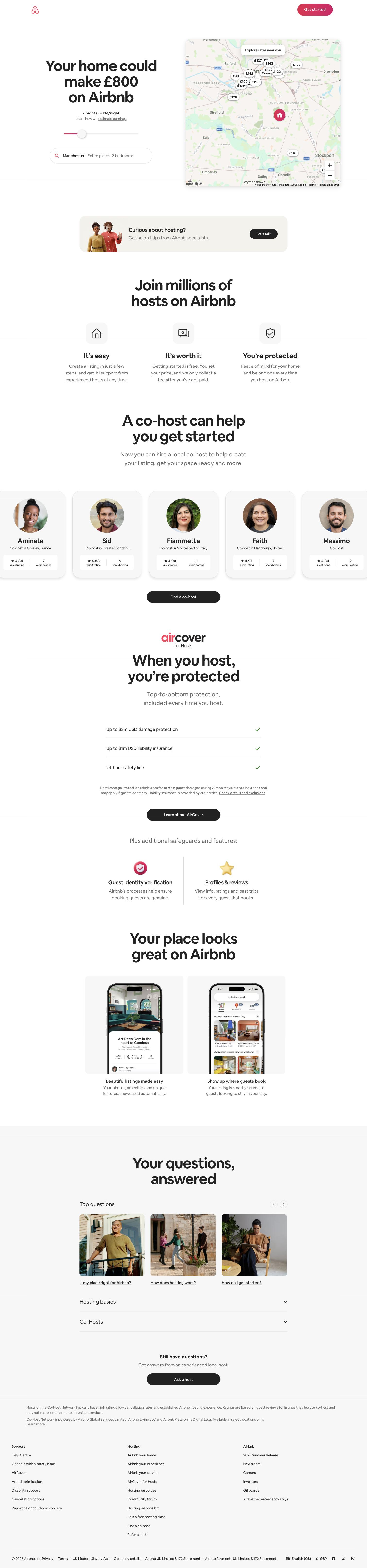
Interactive heroes cluster where the product is easy to try in one gesture: 38% of no-code and AI builder pages and 25% of whiteboard pages, against 5% in developer tools. Developer tools prefer text: 32% of their heroes are headline-only, the highest of any group.
Headlines: six words, give or take two
The median headline is 6 words on homepages and on feature pages alike. Only 21 pages go to 10 words or more, and 37 use three or fewer. Most two-word headlines are feature pages named after the product, but two homepages commit to it. Todoist's "Clarity, finally." and Vercel's "Agentic Infrastructure" are the shortest homepage headlines we captured.

The longest is Mermaid's, at 13 words across two sentences: "You already think in systems. Now you can diagram them just as fast." It works because it is set as two short serif lines, each readable on its own.

One button or two, rarely none
Two hero buttons (110 pages) and one (107) are effectively tied. The second button is usually a lower-commitment path: "Request a demo" beside Cursor's download, "Talk to sales" beside Vercel's "Deploy now", or a "Watch 1-min tour" link on Toggl.
Of the 27 heroes with no button, 20 are feature pages. Linear does it on purpose: its features page is a headline, one sentence of supporting copy and a grid of glowing icons, leaving "Sign up" in the header. Only 4 homepages skip the hero button entirely.
At the other end, 14 heroes show three or more buttons. Asana's homepage puts the sign-up form in the hero: Google, Microsoft, then an email field with "Continue".
Proof: homepages carry it, feature pages mostly don't
This was the biggest split in the data. On homepages, 99 of 125 (79%) show a logo wall and 87 (70%) show testimonials. On feature pages it drops to 46 of 122 (38%) for logos and 55 (45%) for testimonials. Teams treat the homepage as the trust page and assume feature-page visitors have already seen it, an assumption that doesn't hold for visitors arriving from search or ads.

Not all proof is a logo strip. Todoist uses a review count and press quotes from The Verge, PCMag and TechRadar. Stripe opens with a live counter, "Global GDP running on Stripe", above the headline, then a logo row on the fold line.

Backgrounds and button colour
Light still dominates at 64% of heroes. Dark backgrounds account for 16%, gradients 14% and photos or artwork 6%. Developer tools are the exception: only 43% of their heroes sit on a plain light background, and half of the pages are dark themes.
The quieter shift is in button colour. Of the 197 light-theme pages, 70 (36%) use a near-black primary button. Of the 61 dark pages, 15 use a white one. Black or white buttons let the screenshot or art carry the colour. When a brand colour is used, it is usually blue: 65 of the 162 coloured buttons.

Landing page examples by category
Category groups with fewer than 10 pages are combined into "Everything else" (analytics, forms, CRM, finance, scheduling and consumer). Small groups move a lot with one product, so read these as tendencies.
| Category | Pages | Centred + shot | Split | Interactive | Median words | Logo wall | Testimonials | Light background | Black/white button |
|---|---|---|---|---|---|---|---|---|---|
| Developer tools | 44 | 30% | 23% | 5% | 5 | 66% | 66% | 43% | 32% |
| Work & productivity | 41 | 37% | 34% | 2% | 7 | 59% | 63% | 76% | 27% |
| Design, video & creative | 33 | 33% | 12% | 24% | 6 | 67% | 61% | 64% | 27% |
| No-code & AI builders | 24 | 38% | 8% | 38% | 7.5 | 62% | 50% | 46% | 38% |
| Whiteboards & diagrams | 20 | 45% | 15% | 25% | 5 | 55% | 35% | 70% | 35% |
| AI tools | 15 | 20% | 13% | 27% | 6 | 60% | 27% | 53% | 73% |
| Docs & knowledge | 14 | 36% | 43% | 0% | 6 | 50% | 64% | 86% | 57% |
| Everything else | 67 | 30% | 27% | 9% | 7 | 52% | 61% | 75% | 34% |
| All pages | 258 | 33% | 23% | 14% | 6 | 59% | 57% | 64% | 36% |
Three things stand out. AI tools are the most monochrome group: 11 of 15 pages use a black or white primary button, often a white pill on a dark page. Docs and knowledge tools are the most conservative: 86% light backgrounds, no interactive heroes, and more split layouts than any other group. Work and productivity tools almost never put an interactive demo in the hero (1 of 41) and lean on split layouts instead.
What to steal
- Default to centred text over a real product shot, then make the frame yours. Cursor's painting and Toggl's clock dial show the layout doesn't have to look generic.
- Write six words, then cut one. If you need more, split them into two short sentences like Mermaid, and let the subhead carry the detail like Todoist.
- Give the second button a lower-commitment job: a demo, a tour, or a one-click Google sign-up, not a second way to say "start".
- Copy your homepage proof onto feature pages. Only 38% of feature pages show a logo wall, and those pages are often where search traffic lands.
- If your product can do something in one gesture, put it in the hero. Airbnb's earnings slider says more than a button would.
- Try a near-black primary if your hero visual is colourful. A third of light-theme pages already do.
How we counted
We captured these pages in desktop browsers between September and October 2026: 125 homepages, 122 feature or product pages and 11 use-case pages from 132 products. A vision model recorded each hero's layout, headline, button count, background, button colour and whether the page shows a logo wall or testimonials; every attribute is visible and checkable on each screen's page. Headline word counts use the main headline only, not the subhead. These are observations of what each site shipped when we visited, not A/B test results, so we can't tell you which pattern converts better.
To pull your own set, browse the full landing page wall, or connect the Screenrove MCP server and ask your agent for split heroes with a logo wall in your category before you write the first line of your own.