 screenrove
Pricing page design: which plan 95 SaaS pages push, and how
A pricing page design study of 95 highlighted SaaS plans: which name gets pushed, which card it sits on, how it is marked and where the free plan goes.
Pricing pages in our library rarely leave the choice open. 96 of the 127 we captured single out one plan, and on a row of four cards the pick is the third card 35 times out of 56. Look at enough pricing page design and the template is easy to see: a free card on the left, a "Pro" in the middle with a "Most popular" badge, and a "Contact sales" card on the right as the anchor.
This study looks at that one decision: which plan gets pushed, where it sits, how it is marked and where the free plan ends up. Every page is on the pricing pages wall, so you can check any number below against the screenshot.
The pushed plan is usually called Pro
We excluded Superthread, whose single pay-what-you-want card has nothing to compare against, which leaves 95 highlighted plans. Grouping names that share a root ("Cap Pro", "Raycast Pro" and "perplexity pro" count as Pro):
| Highlighted plan name | Pages | Examples |
|---|---|---|
| Pro (and variants) | 34 | Supabase, Vercel, Framer, Gamma, Glide |
| Business (incl. Business+, Business + AI) | 13 | ClickUp, Linear, Miro, Notion, Slack, Loom |
| Premium | 8 | Trello, Jira, Confluence, Toggl, TickTick |
| Team / Teams | 6 | Airtable, Checkly, Lucidchart, StackBlitz |
| Plus | 5 | Amplitude, Cloudinary, Ideogram, Prezi, Ramp |
| Enterprise | 4 | Hygraph, Retool, Appsmith, Penpot |
| Growth (incl. Growth Flow) | 4 | Sanity, Bubble, UXPin, Typeform |
| Other names, one or two pages each | 21 | Creator, Max, Silver, Pinnacle, Organizations |
The name tracks the buyer. Tools sold to individuals push Pro; team tools push Business or Premium. Jotform names its tiers like medals and pushes Silver, the middle of five.
Second of three, third of four
Position is the most consistent part of the pattern. Counting cards in the main row:
| Cards in the row | Pages | Where the highlight sits |
|---|---|---|
| 4 | 56 | 3rd: 35 · 2nd: 13 · 4th: 6 · 1st: 2 |
| 3 | 25 | 2nd: 19 · 3rd: 6 |
| 5 | 7 | 4th: 4 · 3rd: 3 |
| 2 | 7 | 2nd: 6 · 1st: 1 |
74 of 95 highlights sit in the middle of the row, 18 on the last card and only 3 on the first. On 25 of the 35 "third of four" pages, the card to the right is an Enterprise or Custom tier with no price, so the pushed plan is the most expensive thing you can buy without talking to sales. ClickUp, Miro, Notion and Canva all follow it.
The other common shape is "first paid plan after free". By our reading, 27 of the 95 highlight the cheapest paid tier, mostly short rows like Hobby, Pro, Enterprise on Vercel or Free, Pro, Team, Enterprise on Supabase. Three pages hedge and badge two plans: Runway, Smartsheet and Glasp each pair a "Most popular" or "Popular" with a "Best value" further right.

How pricing page design marks the pick
66 of the 95 put words on the highlighted card. Half of them make a popularity claim:
| Label | Pages |
|---|---|
| "Most popular" / "Popular" | 33 |
| "Recommended" / "We recommend" | 14 |
| "Best value" / "Best offer" | 11 |
| An audience line ("Best for teams and consultants", "For growing teams") | 6 |
| Other ("Free trial", "Most powerful") | 2 |
The audience labels are the more useful ones, because they tell a visitor whether the plan fits rather than what other people chose. Miro tops Business with "Best for teams and consultants", Lucidchart uses "Best for collaboration" and Ramp "For growing teams". The "Most popular" pages look much alike.
The visual treatment layers on top. An outline or coloured border is the main signal on 38 pages, a tinted card on 14, and the only filled or coloured button on 17. The loudest version is inversion, a black card in a white row, used on four pages: ClickUp (Business), Glide (Pro), Cal.com (Organizations) and TickTick (Premium).
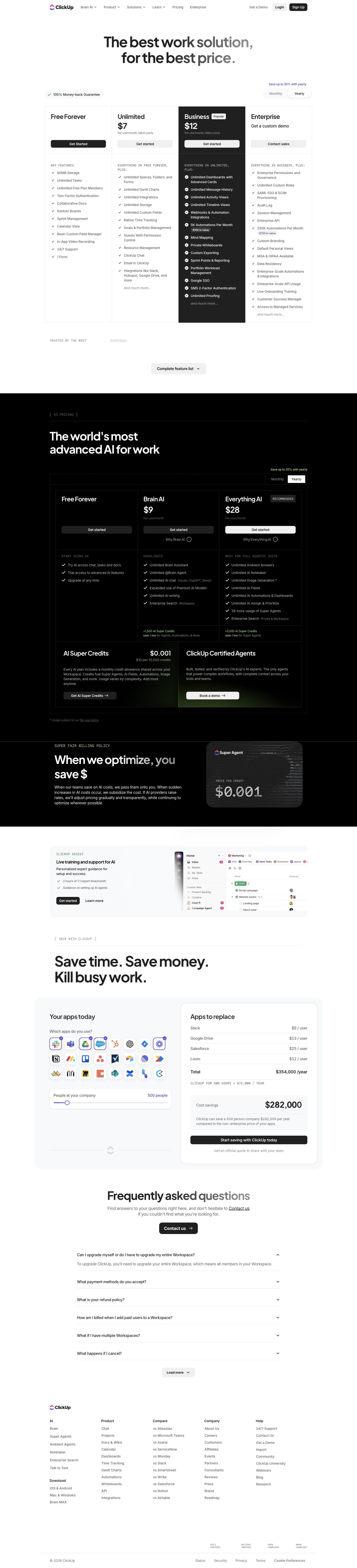
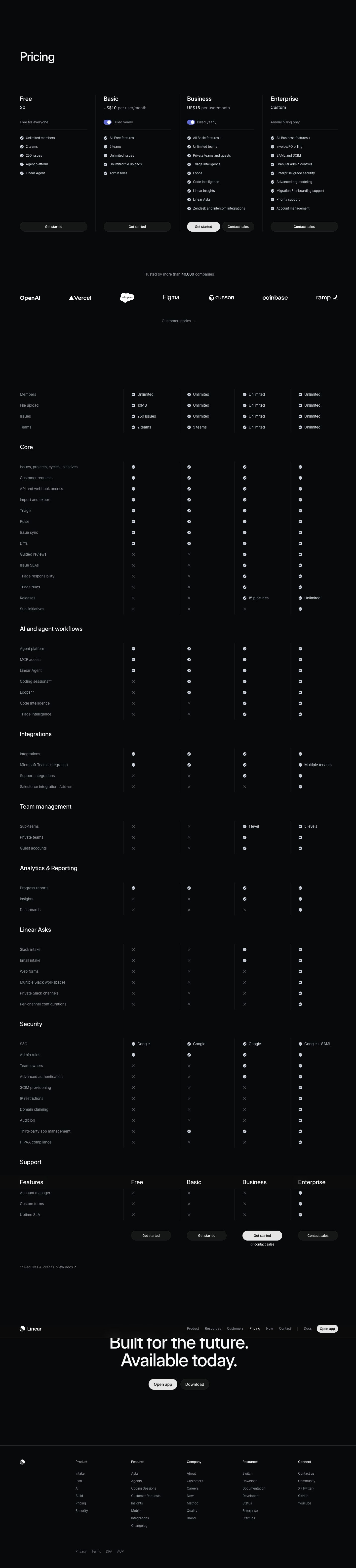
29 pages use no words at all. On 8 of them the button is the only cue: Linear gives Business the single light button in a row of dark ones. Fibery adds just a grey card and the only black "Start free trial" button to Pro.
The exceptions point at the cheap end
Only three pages highlight the first card. Ideogram has no free plan and recommends its cheapest, Plus at $15, with a "Recommended" pill, a lilac outline and the only lilac button. Every other button on the page is near-black, so the pick is lighter than the rest rather than darker.

Clerk goes further and highlights its free Hobby tier: a lit card and the only violet button, "Start building for free", while Pro, Business and Enterprise get grey buttons. The third first-card page is Hygraph, which is the opposite case: its first card is Enterprise.
Four pages push Enterprise itself: Hygraph, Retool, Appsmith and Penpot. Amplitude splits the difference: its Enterprise card is the black one, but the "Recommended" tab sits on Plus.
Where the free plan goes
109 of 127 pages have a free plan, and on most it is the first card in the row, styled like the others. A handful move it out of the row so the comparison starts with paid plans:
- Below the row. Linktree shows Starter, Pro and Premium, then puts Free in a slim row at the very bottom, under its "Agency or Enterprise" bar. Descript gives Free a small "$0" card beneath its four columns, and Opus Clip lists Free under its three paid cards.
- A strip, with Enterprise first. Hygraph leads with a wide, pale-blue Enterprise "Custom" card, puts Growth "From $199 per month" beside it and the free Hobby plan in a full-width strip underneath.
- A strip above. Railway puts Free in its own row above Hobby, Pro and Enterprise.
- Free as the hero. Tally opens with a three-column checklist of free features and pushes Pro and Business below "Do more with Tally". Fillout leads with one "Free, forever" card.

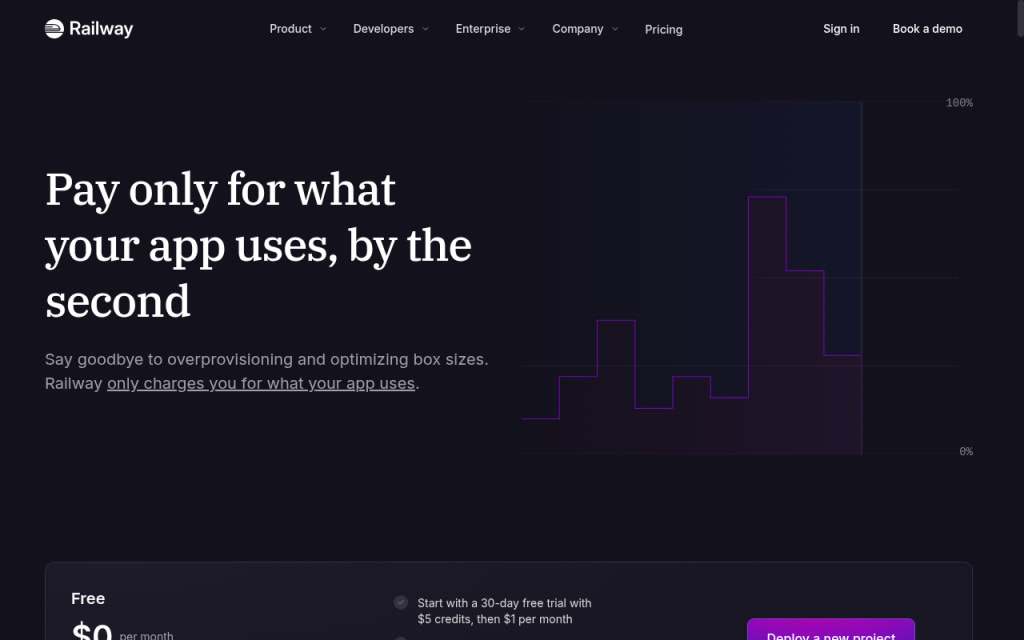
Railway's strip is worth noticing because it states the catch on the card. Fibery does the same from the other side: its Free card carries an amber note, "We resisted the temptation to turn this into a typical camouflaged trial." Both answer the question a visitor has about a free plan before it is asked.
Enterprise is the anchor
102 of 127 pages have an enterprise or contact-sales tier, and it usually sits unpriced at the right of the row, which makes the plan beside it read as the top of the self-serve range. A few pages detach it: Typeform shrinks Enterprise to a dark pill above the cards, Linktree to a bar below them and Taskade to a full-width row under its four plans.
What to steal
- Highlight one plan, not two. 92 of the 95 pages commit to one. A "Popular" plus a "Best value" asks the visitor to settle an argument you could have settled for them.
- Say who it is for. "Best for teams and consultants" does more than "Most popular", which 33 pages already use.
- One contrasting button can be enough. Linear marks its pick with nothing but a button colour; Fibery and Clerk add only a tint. A badge is optional; a clear primary action is not.
- Put the pick next to the anchor. The common shape is the plan you want sold directly left of an unpriced Enterprise card.
- Decide where Free lives on purpose. In the row it is a step on the ladder; below the row it is a fallback. If the free plan has a limit or turns into a charge, say so on the card, as Railway and Fibery do.
How we counted
We captured these pages in desktop browsers with research accounts between September and October 2026. A vision model recorded each page's attributes, including the highlighted plan, the free plan and the enterprise tier, and every value can be checked on the screen's page. We then read the highlight's position and treatment from the screenshots ourselves; where a page used several signals we counted the strongest, and "cheapest paid plan" is our reading of the visible prices. We record what each page showed on the day; we have no A/B results, so nothing here says which treatment converts better.
To pull these as references while you build, connect the Screenrove MCP server and ask your agent for pricing pages that highlight a Business plan with an inverted card, or that put the free plan below the row.