 screenrove
SaaS blog design: what 18 product content pages actually do
SaaS blog design from 18 real product pages: Medium's engagement bar, Glasp's read times, Linear's chapter index, and why none had a newsletter form.
Not one of the 18 blog and content pages on our wall has a newsletter signup form. Eight of them are dark. Those two numbers say a lot about current SaaS blog design: product companies are treating their content pages less like a marketing funnel and more like part of the product, with reading time, contents lists and engagement counts doing the work a subscribe box used to do.
This is a small sample. The blog pages wall holds 18 screens from 12 products, and only four are a classic blog index or article; the rest are changelogs, docs and guides that sit next to a blog and borrow its layout. Treat what follows as a close read of named examples, not a survey.
What the 18 screens are
| What we counted | Screens | Share of 18 |
|---|---|---|
| Blog or content index | 2 | 11% |
| Article | 2 | 11% |
| Changelog / what's new | 5 | 28% |
| Help, docs or guide | 9 | 50% |
| Dark theme | 8 | 44% |
| Category or section filter | 4 | 22% |
| Newsletter signup form | 0 | 0% |
Blog indexes: one sells depth, the other sells a curriculum
The two index pages could hardly be further apart. Glasp's Discover page is a three-column card grid under the heading "Deep Dives" with a "View All" button. Each card gets a small icon tile instead of a cover image, a topic chip in the top-right corner (AI, Product, Knowledge), a two-line excerpt and a "min read" footer. The read times we can see run from 15 to 20 minutes. The page is advertising long reads, not quick takes.

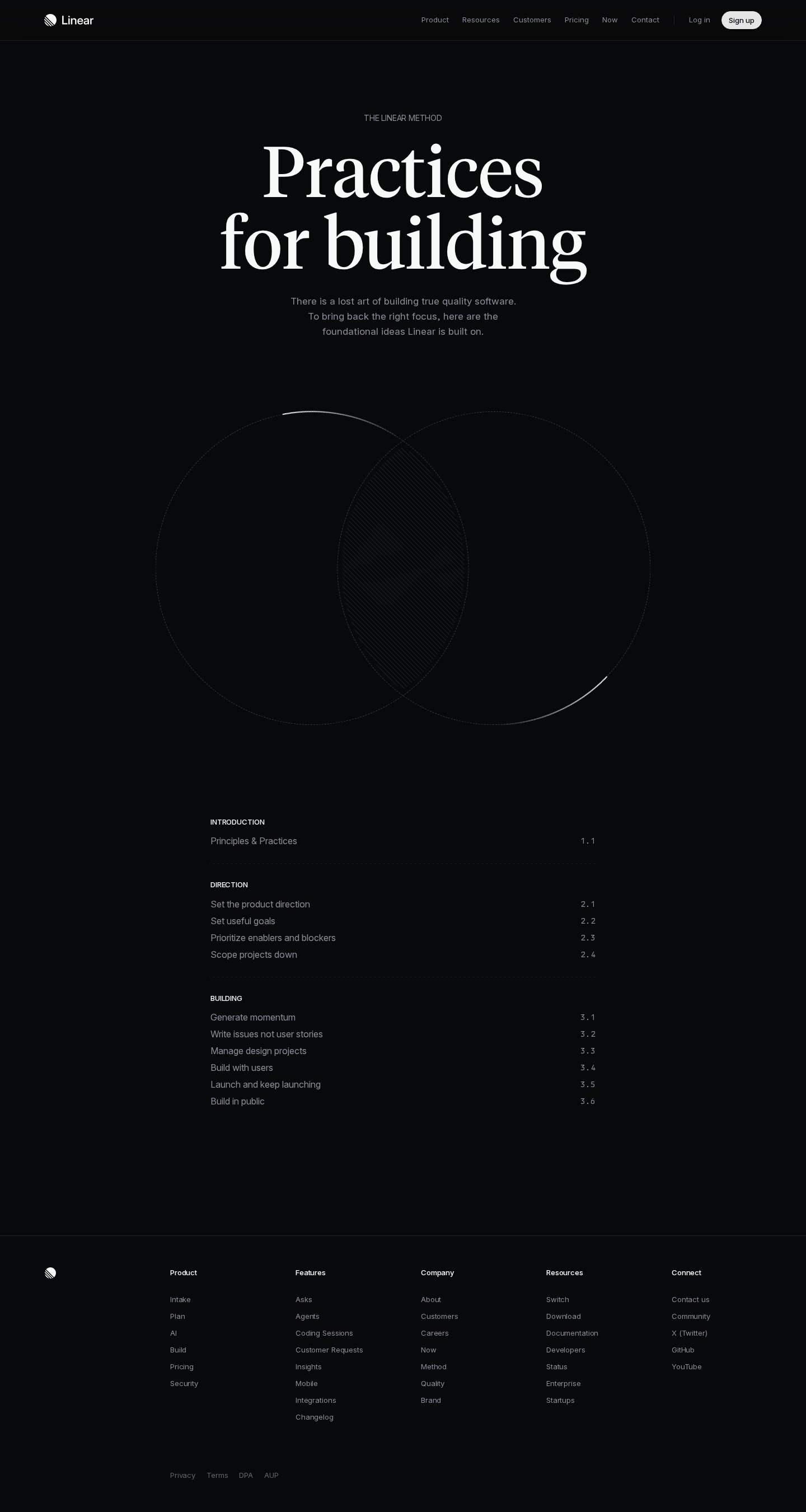
Linear's Method page takes the opposite approach. It opens on a huge two-line serif headline, "Practices for building", over a hatched Venn diagram, then lists its content as a numbered chapter index: Introduction 1.1, Direction 2.1 to 2.4, Building 3.1 to 3.6, with the numbers set in monospace on the right. No dates, authors or thumbnails. It reads like a book's contents page: these pieces are meant to be read in order and kept.
Articles: engagement goes above the cover
On Medium's blog post about its State of Writing Report, the order from top to bottom is: five followable topic chips (each with a + button), the headline, a one-line subtitle, the author with a Follow button, "7 min read" and the date, then a hairline action bar showing 5.8K claps, 147 responses and 42 reposts. Only then does the cover image start.

The lesson is placement: counts above the fold tell a new reader that others found this worth their time before they commit seven minutes. The page also carries a yellow "Welcome Offer" banner (30% off, "Upgrade now") above the blog header, so the only conversion ask on the page is a paid plan, not an email address. The dark-mode version adds a reading layer: a top highlight in a green wash with a response count in the margin.
Changelog cards that borrow from social feeds
Postman's "What's New" feed in its Public API Network is a changelog written by publishers. Each card has a verified publisher name and date, a headline, type and folder chips ("New Feature", "Webhooks Integration", "+3"), and a bullet list that fades out after five or six items into a "Read more" link. The footer is pure social feed: six emoji reactions totalling 51, "No comments", and "1.1k views" on the right.

The fade is the useful pattern: it signals length without forcing every card to full height, so a feed of long release notes stays scannable. Raycast tackles the same problem with a macOS / Windows / iOS / macOS V1 switcher beside its changelog title; the other changelogs are worth a look too.
Contents first, body second
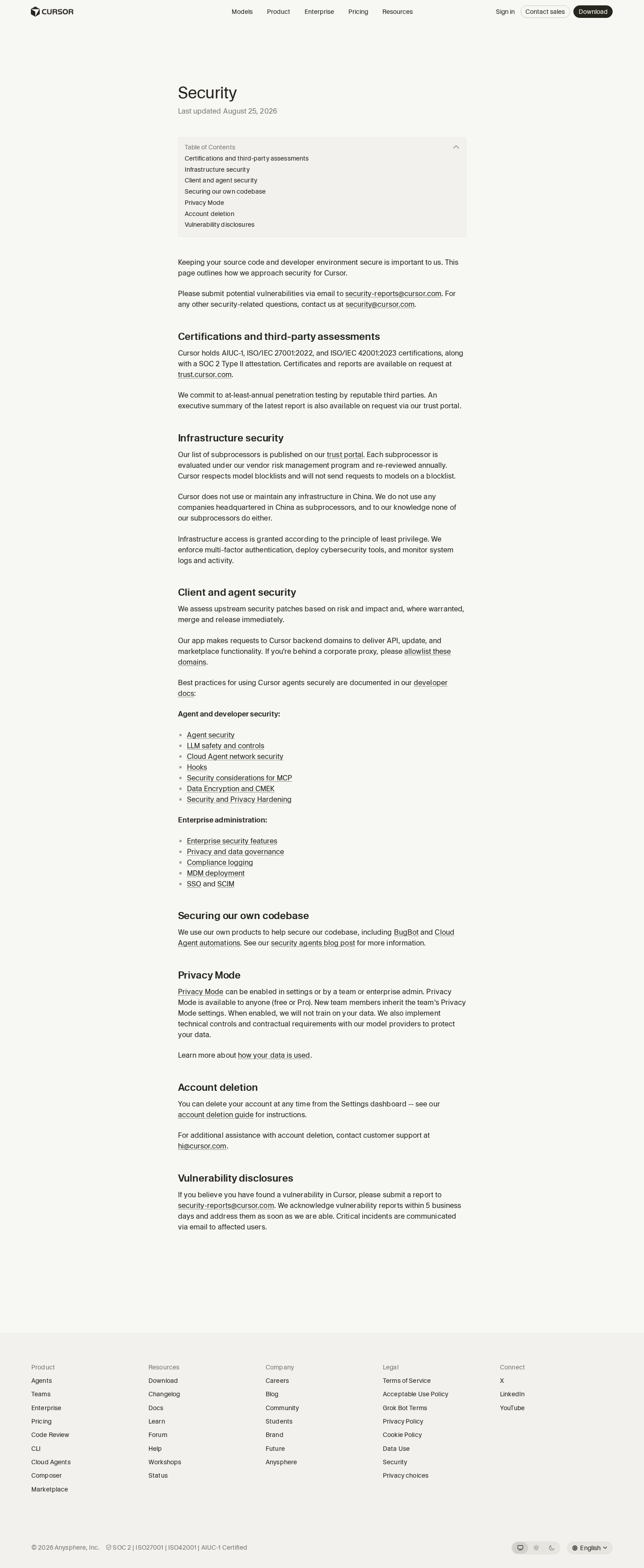
Cursor's Security page is the cleanest long-form layout in the set. Under the title sits "Last updated August 25, 2026", then a grey, collapsible "Table of Contents" box listing all seven sections, from "Certifications and third-party assessments" to "Vulnerability disclosures". The date answers "is this current?" and the contents box answers "is my question here?" before any scrolling.
Product Hunt's Launch Guide uses the same idea as a sidebar. A pastel gradient header, a coral "Launch interactive guide" pill, and a right-hand "Links" column with an emoji in front of each entry: Why launch on Product Hunt, Hunters, Setting goals, Content checklist, Marketing strategies.

Where the newsletter form went
None of the 18 screens has an email field asking you to subscribe. The closest is Product Hunt: a "Subscribe" button in the top nav and a "Newsletter" link in the footer, both one click away from the content rather than embedded in it. The asks we did see were product-shaped: Medium's upgrade banner, Product Hunt's interactive guide, Follow buttons on authors and topics.
Dark mode is the other pattern worth noting. Eight of 18 screens are dark, mostly developer tools (three Raycast pages, StackBlitz, Leonardo.ai, Linear, Rive) plus Medium's dark reading mode. Cursor shows a system / light / dark toggle in its footer.
SaaS blog design: what to steal
- Show the reading commitment. Glasp and Medium print read time on the card or byline. If pieces are long, say so.
- Put proof above the cover. Medium's counts sit under the byline, not at the end where few readers arrive.
- Fade long entries. Postman's fading bullets plus "Read more" keep a feed scannable without hiding length.
- Date and contents up front. Cursor's "Last updated" line and contents box answer two questions at a glance.
- Number evergreen content. Linear's 1.1 to 3.6 index turns essays into a curriculum.
- Let chips filter. If you label cards by category, let readers filter by it.
How we counted
We captured these pages in desktop browsers with research accounts in September and October 2026. A vision model recorded each screen's attributes (page type, theme, newsletter, categories), and we checked the claims in this article against the screenshots; every attribute is visible on each screen's page. Eighteen screens from 12 products is a small sample, weighted toward developer tools and toward docs and changelogs rather than classic blogs. We record what we saw, not how these pages perform, so nothing here is a claim about traffic or conversion.
Want more references while you build? Connect the Screenrove MCP server and ask your agent for "blog index layouts with read times" or "changelog cards with Read more", then browse the full blog pages wall.