 screenrove
SaaS pricing page examples: 127 public pricing pages compared
SaaS pricing page examples from 127 products: four plans is the norm, 86% have a free tier, the median cheapest paid plan is $12, and who breaks the pattern.
Four plans in a row is the default SaaS pricing page: 68 of the 127 pages we captured (54%) have exactly four, 86% offer a free plan and 80% end in an enterprise or contact-sales tier. The interesting SaaS pricing page examples are the ones that break it, like Superthread letting you drag your own price between $3 and $67, or Fibery writing "We resisted the temptation to turn this into a typical camouflaged trial" on its Free card.
We captured the public pricing pages of 127 products, from Linear, Notion and Figma to Gumroad and Stripe, and counted the same things on each: how many plans sit in the main row, whether there is a free plan and an enterprise tier, a comparison table, a FAQ, a usage slider, which plan is singled out and what the cheapest paid plan costs. Every page is on the pricing pages wall, so you can check each number against the screenshot.
SaaS pricing page examples, by the numbers
| What we counted | Pages | Share of 127 |
|---|---|---|
| Four plans in the main row | 68 | 54% |
| Three plans in the main row | 35 | 28% |
| Two plans / five plans | 12 / 9 | 9% / 7% |
| Free plan | 109 | 86% |
| Enterprise or contact-sales tier | 102 | 80% |
| Both a free plan and an enterprise tier | 89 | 70% |
| FAQ | 109 | 86% |
| Feature comparison table | 90 | 71% |
| Monthly/yearly toggle | 85 | 67% |
| One plan visually singled out | 96 | 76% |
| Usage slider or calculator | 28 | 22% |
| Cheapest paid plan, median of 102 pages quoting USD (middle half) | $12/mo | $9 to $20 |
The other three pages: tldraw sells one SDK licence, and Gumroad and PostHog show no plan cards at all.
Four plans is the norm, and the edges are where the decisions are
103 of 127 pages (81%) put three or four plans in the main row. 51 pages combine exactly four plans with a free tier, an enterprise tier and a FAQ, the closest thing to a template in this set. Five plans are rare (9 pages, including monday.com, Wrike, Bubble and Glide), and so are two (12 pages, such as Maze, Workflowy and Tally).
The free and enterprise columns are close to universal. 86% of pages have a free plan and 80% an enterprise or contact-sales tier, but the 25 pages without an enterprise tier are telling: they are mostly tools sold to individuals, such as Whimsical, Todoist, Coolors, Gamma, Tana and TickTick. If nobody buys your product through procurement, a "Contact sales" card is just decoration.
Only five pages have neither a free plan nor an enterprise tier: Gumroad, Dribbble, Medium, tldraw and Prezi.
What the cheapest paid plan costs
Across the 102 pages that quote a paid price above zero in US dollars, the median cheapest paid plan is $12 a month. Half sit between $9 and $20, and 59 of the 102 fall between $5 and $15. $12 is the single most common price, on 10 pages. That is the price shown by default, which on many pages with a toggle is the annual rate per seat. The 11 pages that showed prices in pounds have a median of £8.49.
The six pages whose cheapest plan starts at $50 or more are all developer or B2B infrastructure: GitBook ($65), Canny ($79), Cloudinary ($89), Dub ($90), CodeSandbox (from $170) and Hygraph (from $199). None of them is missing a free plan except Dub, which leads with a 14-day trial instead.
Two pages refuse the format entirely. Gumroad has no plan cards: two colour blocks state "10% + $0.50" per transaction for direct sales and "30%" through its Discover marketplace, under the line "No hidden fees, no monthly charges." Superthread replaces its entry plan with a slider.

At the other end, Amplitude and Mixpanel price their first paid plan "Starts at $0", so the paid tier is defined by usage rather than an entry fee.
Which plan gets highlighted
96 pages (76%) single out one plan with a badge, a tint, a border or the only filled button. 34 of those highlight a plan with "Pro" in its name, more than any other name. The loudest treatment is inversion: a black card in a row of white ones, on ClickUp (Business), Glide (Pro) and Cal.com (Organizations).

Two pages point the highlight at the cheap end instead. Ideogram recommends its cheapest plan, Plus, and gives it the only lilac button. Clerk highlights its free Hobby tier with a lit border and the only violet button on the page.

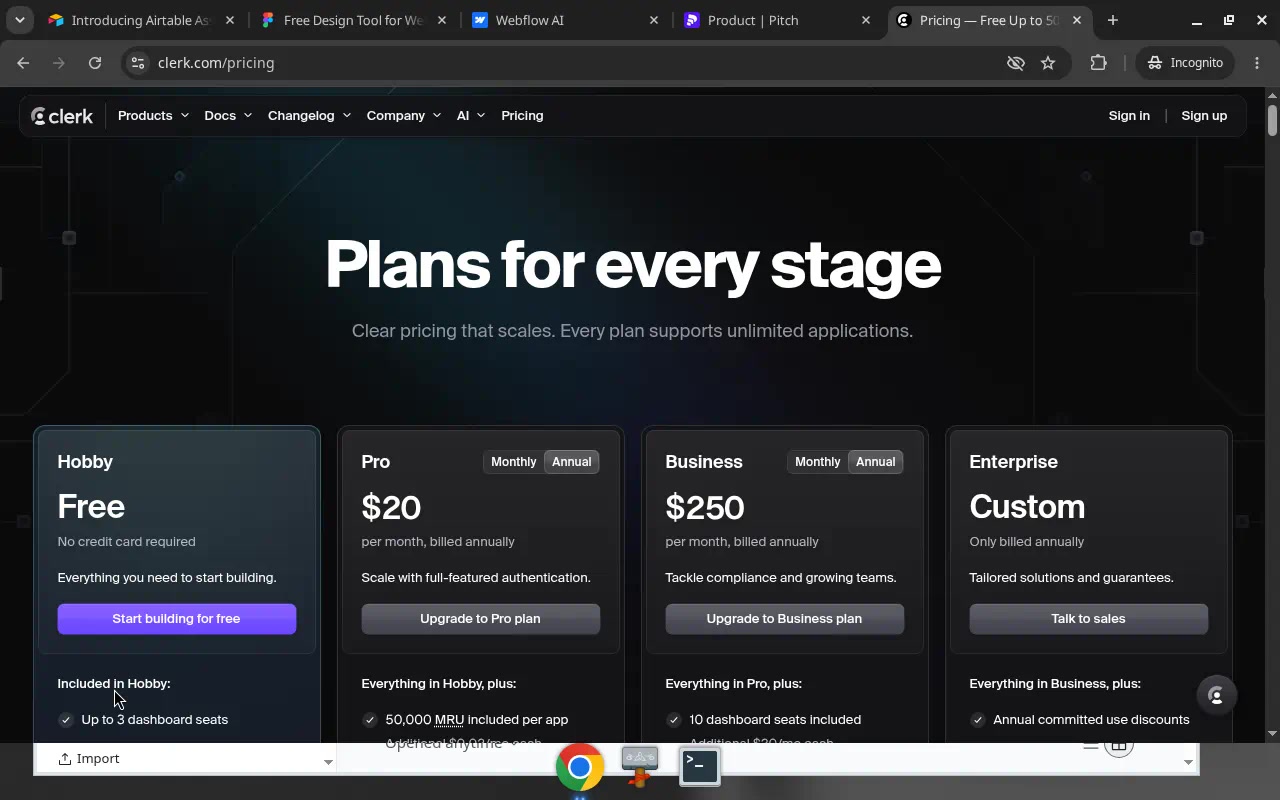
Four pages highlight enterprise itself: Penpot, Retool, Appsmith and Hygraph. Penpot's pink-glowing Enterprise card sits beside a $0 Professional plan described as "Free and fully featured."
Free plans pushed out of the row
A free tier is near universal, but where it sits varies. Some pages keep it as the first card. Others demote it below the paid row so the first thing you compare is paid plans.

Descript does the same with a small "Free $0" card beneath its four columns. Hygraph goes further: Enterprise is the first and largest card, Growth "From $199 per month" sits beside it, and the free Hobby plan is a full-width strip underneath. Cloudinary orders its row Advanced ($224), Plus ($89), Free, Enterprise, priciest first.
Fibery keeps Free in the row and defends it. An amber note on the card says the free plan is not a disguised trial, which answers the question most visitors have before they ask it.

Calculators, tables and FAQs
FAQs (86%) and comparison tables (71%) are standard. The 18 pages without a FAQ include Linear, Cal.com, Webflow and Sentry, so skipping one is not a sign of a weak page, but it is a minority choice.
Usage sliders and calculators are rarer, on 28 pages (22%), and they cluster where price depends on volume: Zapier's "How many tasks do you need?" (100 to 2M), Resend's email slider from 3,000 to 3,000,000+, Make's credits slider, and team-size fields on Jira, Confluence and monday.com. Cards on Lovable and Framer carry their own credits dropdown instead.

About two thirds of pages (85) have a monthly/yearly toggle. How they label the annual saving is covered in our annual pricing discounts study.
What to steal
- Default to three or four plans. 81% of pages do. If you need more price points, put them inside a card as a dropdown or slider, the way Glide, Lovable and Framer do with credits.
- Drop the enterprise card if nobody buys through procurement. A quarter of these pages have none, and they are mostly tools bought by one person with a card.
- Highlight the plan you actually want people on. Clerk wants signups, so Free glows. Ideogram wants a first purchase, so the cheapest plan is recommended. Don't badge "Pro" by habit.
- Decide where Free sits. Keeping it in the row says "start here"; moving it below, like Linktree, Descript and Hygraph, makes the paid comparison the first read.
- Answer the trust question on the card. Fibery's one-line note and Gumroad's "No hidden fees, no monthly charges" do more than a long FAQ.
- Add a calculator only when price depends on usage. Zapier and Resend need one. A per-seat tool with three plans does not.
How we counted
We captured 127 public pricing pages in desktop browsers, using research accounts, between September and October 2026. A vision model recorded each page's attributes, and you can check every one on the screen's own page. Plan counts are the cards in the main row, so a free plan moved below the row is not counted in it. Prices are what the page showed by default, often the annual rate. We record what pages show, not how they perform: none of this is A/B test data, and we make no claims about conversion.
Want these as references while you build? Connect the Screenrove MCP server and ask your agent for "pricing pages with a usage slider" or "pricing pages where the free plan sits below the paid row".