 screenrove
Template gallery design: what 142 real catalog pages do
Template gallery design across 142 catalog screens from 64 products: what gets listed, card styles, why 3 columns win, image category tiles and previews.
Template gallery design has a clear default: of the 118 catalog screens where we could count columns, 53 used exactly three, almost twice as many as the next most common layout. The more useful finding sits inside those columns. The template previews that told us the most were not plain screenshots: Fibery draws each template's databases as coloured tags, VEED renders each text preset in its own type, and Sanity gets by with a single emoji.
This study covers 142 screens from 64 products on our catalogs and galleries wall: template galleries, app stores, asset libraries, community showcases and the "your files" grids that every tool ships. Seven more screens on the wall had no attributes recorded and are left out of the counts.
What a catalog page lists
A vision model tagged each screen with what it lists, the card style, whether it has category navigation, search and a featured row, and how many columns the grid uses. Templates and personal files make up more than half the set.
| Lists | Screens | Products | Image cards | Category nav | Search | Featured row | Most common columns |
|---|---|---|---|---|---|---|---|
| Templates | 41 | 29 | 33 | 35 | 31 | 5 | 3 (21 of 41) |
| Your files & projects | 39 | 25 | 30 | 16 | 22 | 0 | 4 (10 of 18) |
| Apps & integrations | 20 | 15 | 3 | 16 | 16 | 9 | 3 (11 of 20) |
| Assets & media | 16 | 10 | 13 | 15 | 10 | 0 | 3 (5 of 14) |
| Community work | 15 | 9 | 13 | 8 | 9 | 3 | 3 (10 of 14) |
| Listings and other | 11 | 7 | 6 | 8 | 9 | 2 | 3 or 4 |
Two patterns jump out. Template galleries are the most fully equipped catalogs: 35 of 41 had category navigation and 28 had both categories and search. And featured rows belong to app stores. Nine of the 20 app and integration screens had one, against 5 of 41 template screens and none of the 39 file grids.
Card styles: images for templates, icons for apps
Across the set, 98 screens used image cards, 36 used icon cards and 8 used text-only cards. The split follows what is listed. Templates are 33 image to 8 icon. Apps flip it: 17 of 20 app screens lead with a logo, because the logo is the thing people scan for.
The eight icon-card template screens are worth a look, since they had to explain a template without a picture. Make stacks the icons of the apps a scenario connects and closes each card with a usage count ("Used 110579 times" on the ChatGPT and Google Sheets template). CodeSandbox pairs a framework logo with a fork count: React (TS) 255.5k, Angular 291.5k. When the preview cannot carry the card, a number does.
Template gallery design: why three columns wins
After three columns (53 screens), the counts were four (30), two (16), five (9), six or more (6) and one (4). Template galleries leaned on three more than most: 21 of 41 screens. Three is wide enough for a landscape thumbnail plus a two-line title without shrinking the preview to texture.
The outliers explain the rule. Fibery drops to two columns because each card carries a paragraph of description. Adobe Express runs a seven-column masonry because its templates are portrait posters and stories that read fine small. Card content sets the column count, not the other way round.
Of the 24 screens with no column count, 21 were personal file grids, many holding a single card, which says more about a new account than about layout. A files grid is a catalog that starts empty, and Bolt, Plane and Lucidchart each showed a single lonely card.
Category navigation as image tiles
98 of 142 screens had category navigation. Most used tabs, pills or a sidebar list. Four products turned the categories themselves into image tiles, which makes the category row the most visual thing on the page.
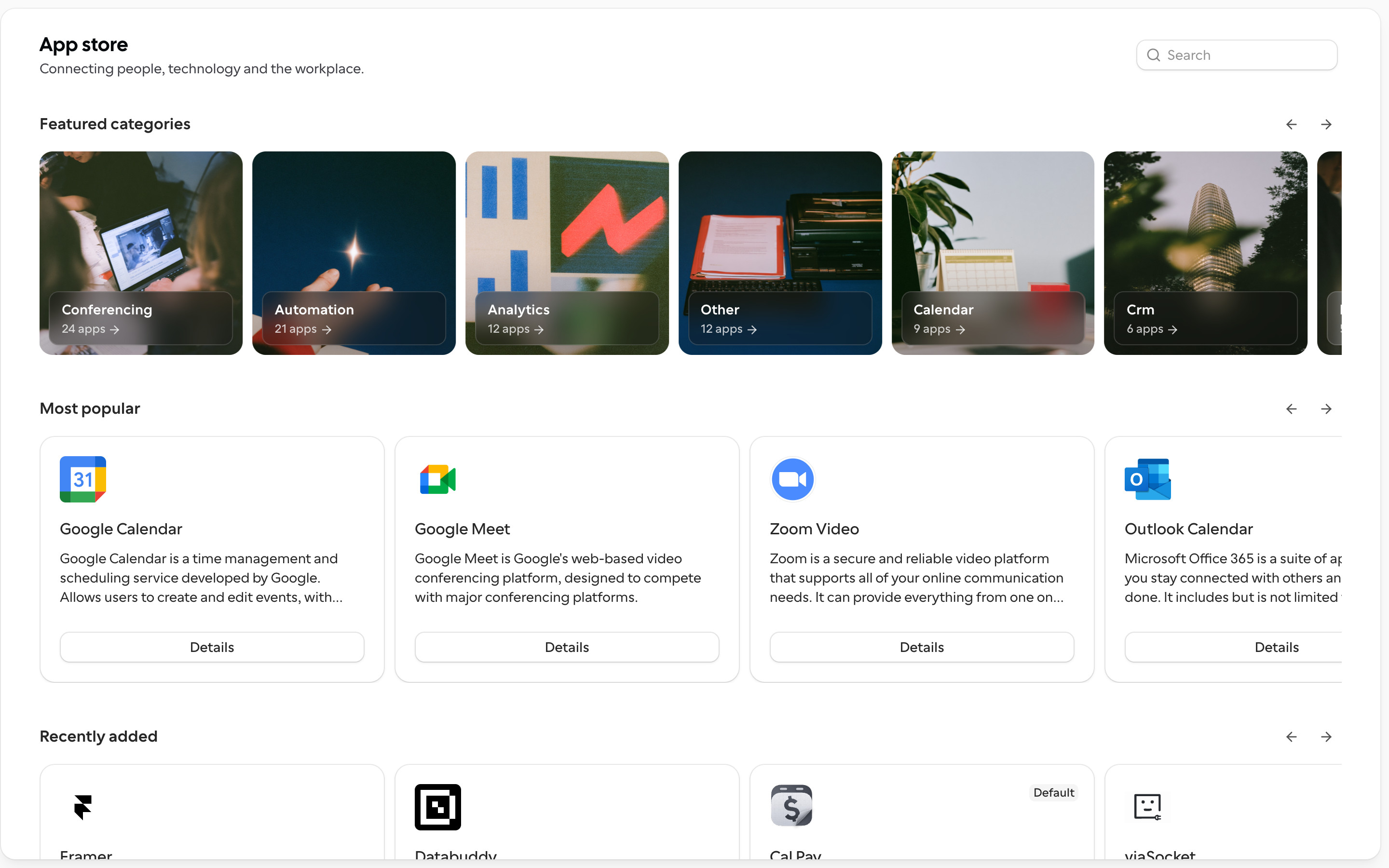
Cal.com puts photo tiles with app counts above its "Most popular" and "Recently added" rows. Canva shows pastel tiles with a fanned design preview (Presentation, Poster, CV, Email, Link in Bio) under a "Search millions of templates" bar. Adobe Express lays four category banners (Seasonal moments, Layouts, Social media and ads, Print) over its masonry grid.

ElevenLabs is the most instructive case. A sound effects library has nothing to screenshot, so the category tiles do the visual work while the results stay a table of descriptions, durations and download counts.
Counts in the category list are the other strong pattern. SurveyMonkey shows Most Popular (13), Forms (128), Events (33). Jotform goes further.

Template previews that aren't screenshots
Most template cards are a shrunken screenshot of the template. At 300 pixels wide, a dashboard or a doc becomes grey texture. The previews that held up best in our captures either redrew the template or dressed up the screenshot.

For a tool where the template is really a schema, Fibery's diagrams say more than a screenshot of an empty table would. The 30-60-90 Onboarding card shows EMPLOYEE, ONBOARDING TASK and ONBOARDING TASK TEMPLATE, which is the whole idea of the template in three tags.

Softr keeps the screenshot but stages it: desktop and phone together, each on a different tint. That answers "does this work on mobile?" in the preview. Its theme library goes the other way, showing each of its "30+ pre-made themes" as a tiny page with a Heading, an accent pill and a Body card, so Mulberry and Blue Moon are judged on colour alone.

VEED shows that when the asset is small, the preview can be the asset itself. And Sanity shows the floor: three "Created by Sanity" cards with an emoji (a waving hand, a chart, an open book), a title and one line of description. It is plain, but every card is readable, which is more than many shrunken screenshots manage.
Search and featured rows
97 of 142 screens had search, and 77 had both search and categories. The 24 with neither were mostly personal file grids and short integration lists, where browsing is enough. In big galleries search is the hero: Canva's sits under the headline, and Softr's runs the full width of the modal.
Featured rows were rare at 19 screens, and 14 of those also had search. In app stores they work as a starter set: Cal.com's "Most popular" row leads with Google Calendar, Google Meet and Zoom. In template galleries the better version is personalised. Mural opens on "Product managers recommend these templates" under a "For you" tab, and Sanity keeps its own three templates above a team list that reads "There are no templates in this organization."
What to steal
- Start at three columns. Move to two only when cards carry a paragraph, and to five or more only when the items are portrait images.
- Match the card to the item. Images for templates and media, logos for apps, a number (uses, forks, installs) when the preview cannot carry the card.
- Redraw instead of shrinking. A schema diagram, a type sample or a phone-plus-desktop mock reads better than a 300-pixel screenshot.
- Make categories visual when the items aren't. ElevenLabs and Cal.com put their imagery in the category tiles, not in every card.
- Count every category. It sizes the library at a glance, but check that the numbers make sense next to your headline total.
- Keep featured rows for stores and starters. None of the 39 file grids used one, and only 5 of 41 template screens did.
How we counted
We captured these screens in desktop browsers with research accounts between September and October 2026. A vision model recorded each screen's attributes (what it lists, card style, columns, categories, search, featured row), and you can check them on each screen's page. Column counts were recorded only where a grid was clear, which is why the column figures use 118 screens. We describe what we saw on screen. We have no A/B test or conversion data, so none of this says which layout performs better.
To pull these references into your own work, connect the Screenrove MCP server and ask your agent for "template galleries with category tiles" or "catalog pages with featured rows". Or browse the full catalog pages wall.