 screenrove
What is DESIGN.md? A practical guide with real examples
DESIGN.md gives a coding agent your colors, type and layout rules in one file. What goes in one, how to write it, and measured examples from Stripe, Linear and Vercel.
DESIGN.md is a plain-text file that describes a visual design system for coding agents. It sits in your repository next to README.md, and it tells Claude Code, Cursor or any other agent which colors, type sizes, spacing and components to use, and when. The format started in Google’s Stitch design tool, and Google published it as an open specification in April 2026.
The problem it solves is familiar. Without guidance, an agent invents styles each time it builds a screen: a slightly different gray, a new button radius, a heading size nobody chose. The result works but looks generated. A DESIGN.md gives the agent one source of truth to read before it writes any CSS.
What goes in a DESIGN.md
The specification pairs machine-readable tokens with prose explaining how to use them. In practice a useful file covers five things:
- Palette with roles. Not just hex values, but what each one is for: canvas, surface, primary text, secondary text, accent, border.
- Type scale. Each role (hero, section heading, body, small controls) with size, line height, weight and letter spacing.
- Layout. Content width, grid, section spacing and how density changes between marketing pages and the product.
- Components. How buttons, inputs, cards and navigation look and behave.
- Rules. Short do and don’t statements the agent can check its work against.
The roles matter more than the values. “Use #0a2540” is a value; “headings on pricing pages use #0a2540, body text uses a lighter slate” is a rule an agent can apply to a screen it has never seen.
Real examples, measured from live products
Every Screenrove collection includes a DESIGN.md measured from the live interface. Three examples show how different the systems are.
Stripe: two systems in one brand
Stripe’s marketing pages and its developer tools look like different companies. The homepage hero is set in sohne-var at 48px / 55.2px with a light weight of 300, and headings use deep navy (#061b31 on the homepage, #0a2540 on pricing). The docs switch to a system font with body text in #3c4257. A good DESIGN.md records both contexts separately so the agent doesn’t mix them.
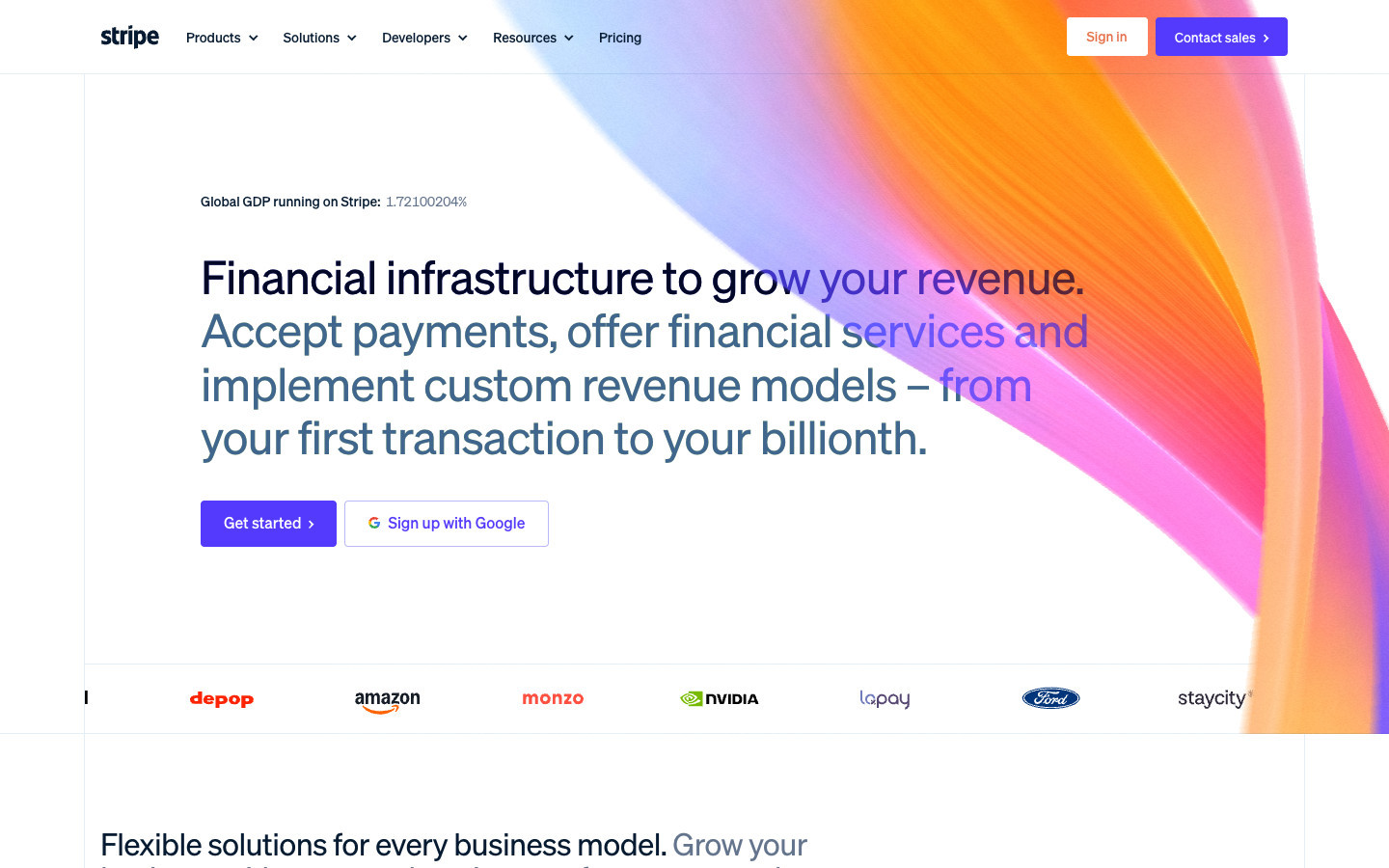
See Stripe’s full design system and DESIGN.md.
Linear: dark marketing, light product
Linear’s marketing site is dark, with a #08090a canvas and #f7f8f8 text. Its hero is 64px / 64px at weight 510 with tight −1.408px tracking. Inside the product, the research workspace we captured is light, and its colors are defined in LCH rather than hex. Writing them down as observed avoids rounding errors when an agent converts them.
See Linear’s design system and DESIGN.md.
Vercel: one monochrome system throughout
Vercel keeps marketing and console almost identical: Geist Sans, a #fafafa canvas, white surfaces and #171717 text. The marketing hero is 64px / 64px at weight 400 with very tight −3.84px tracking, which is a large part of why it looks the way it does. Miss that letter spacing and the page looks generic.
See Vercel’s design system and DESIGN.md.
How to use DESIGN.md with Claude Code
- Put
DESIGN.mdin the root of your repository. - Add a line to
CLAUDE.md(or your agent’s rules file): “Follow DESIGN.md for all UI work. Use its tokens; do not invent new colors or sizes.” - When you ask for a screen, name the context: “Build the settings page using the product context in DESIGN.md.”
- After the agent builds, ask it to check the result against the rules section.
If you use the Screenrove MCP server, your agent can fetch any collection’s design guide with get_design and pair it with the matching screenshots.
Start from a reference, then make it yours
A measured guide from a product you admire is a good starting structure. It is not a brand to copy. Keep the parts that make it work, such as the type scale ratios, the restraint in the palette and the spacing rhythm, and replace the colors, font and voice with your own. Our guides are independent observations, not official specifications, and we do not distribute font files.
Browse the design systems: Linear · Cursor · Vercel · Airbnb · Stripe · Duolingo · Notion · Raycast · Cal.com · Framer · Supabase · Slack · Perplexity · Coda · Airtable · Figma · Canva · Webflow · Pitch · Typeform · Loom · Resend · Clerk · Mercury · Railway · Miro · Ramp.